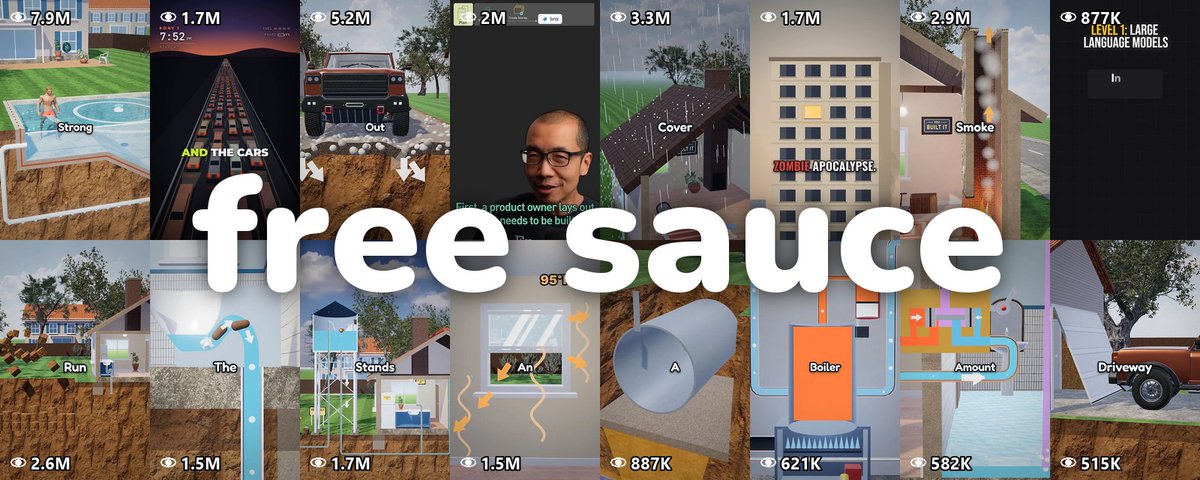
Um quintal aberto em corte teve 13,1 milhões de views. Era o PRIMEIRO vídeo de uma página nova no TikTok, então eu reconstruí o formato como um prompt gratuito do Claude, e depois fiz o mesmo para histórias de bonequinho (stickman) e explainers em formato de aula.
Este é o original, publicado por You Built It em 11 de outubro:
Vídeo do artigo · 1 min 7 s
Depois eu procurei todo mundo que estava liberando esse tipo de coisa, e 7 passaram no corte. Cada um é gratuito num post ou num repositório aberto, sem nada para comentar em troca.
Aqui dentro: o quintal 3D, a história de stickman, o reel de aula, um reel de motion de UI, um explainer espacial, cartoons 2D de “e se”, uma skill de animação em canvas, 66 estilos de filme, uma biblioteca de motion e b-roll gratuito.
Os 10 rodam no Claude Code. Um plano do Claude é a única coisa que você paga (um deles usa o plano gratuito do ElevenLabs para a voz).
Eu rodei os meus 3 do começo ao fim com um avaliador cego do Claude. Eu não rodei os outros 7, então leia qualquer “melhor” aqui como o mais salvo.
Um Short 3D de 60 a 75 segundos. Uma casa fica sobre um bloco de terra aberto como um bolo, enquanto um narrador calmo constrói uma coisa do dia a dia, um problema de cada vez.
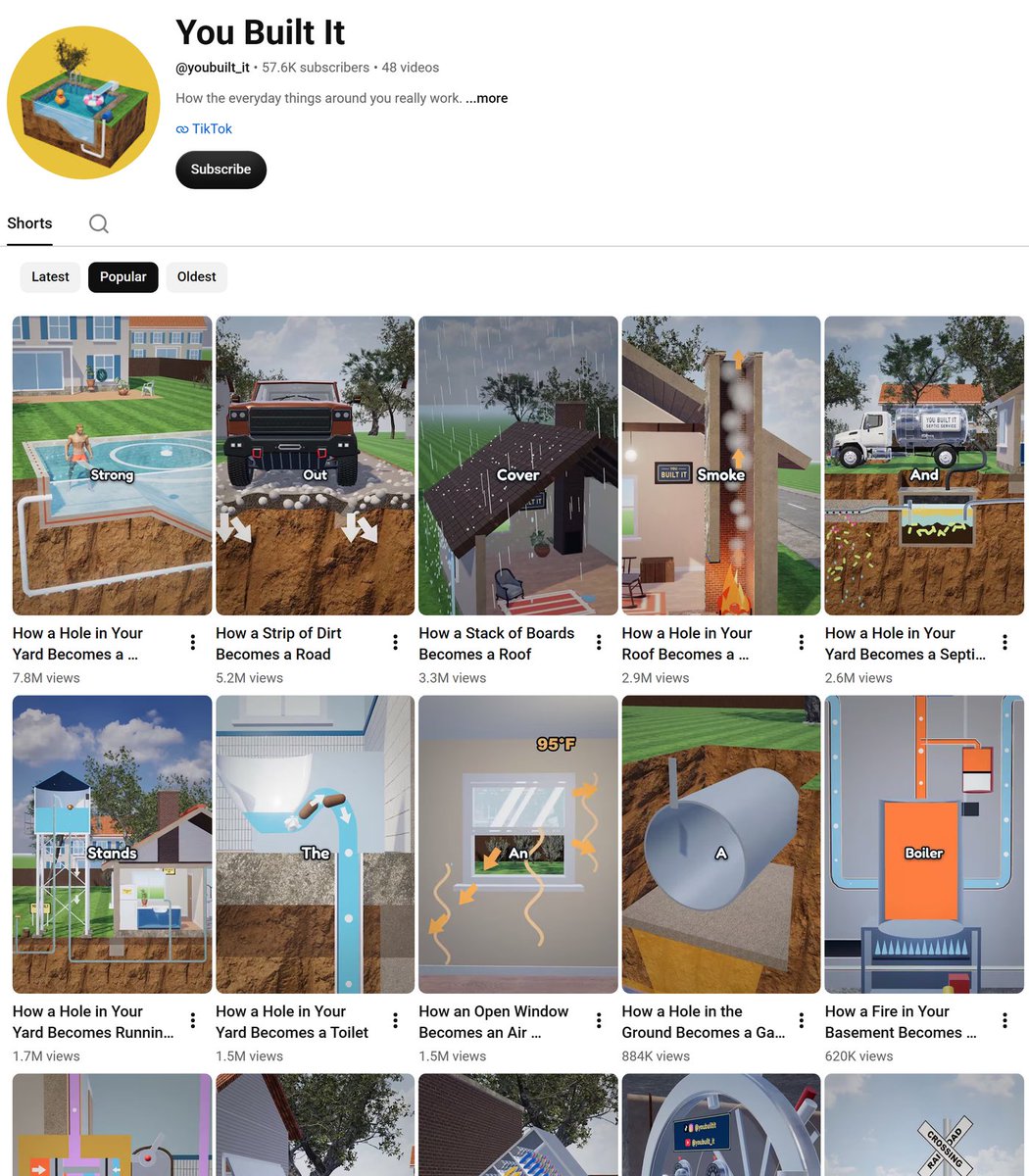
Os 48 TikToks do You Built It têm 58,6 milhões de views desde 11 de outubro. Os YouTube Shorts dele, ordenados por views em 30 de outubro:
Print do artigo: canal You Built It no YouTube, Shorts ordenados por views em 30 de outubro.
O segundo maior Short, uma faixa de terra que vira uma estrada, tem 5.257.944 views:
Vídeo do artigo · 1 min 7 s
Como é feito: a página não diz. Na tela, é um 3D semi-realista, um bloco de terra aberto como um bolo e uma palavra da legenda de cada vez, sobre um narrador calmo e rápido.
O nosso guia reconstrói isso como um único paste. O Claude Code escreve o roteiro, faz a voz no seu PC, monta o quintal no Blender (gratuito) e adiciona as legendas.
O exemplo prático dele é este lago, então rodar o guia te dá exatamente este vídeo (sim, os peixes também):
Vídeo do artigo · 1 min 6 s
Um avaliador cego deu 59/70, enquanto os próprios vídeos do You Built It tiraram 55 e 61 nele (ele é DE FATO rigoroso). A linha mais fraca é o visual, porque os nossos peixes são mais simples do que o quintal deles.
Para começar:
salve o whatif_guide.md como CLAUDE.md numa pasta vazia
abra o Claude Code ali e diga “make one video, you pick the topic”
Leva cerca de 2,5 a 3 horas num PC gamer, na maior parte sem supervisão. O formato é do You Built It; isto é uma reconstrução independente.
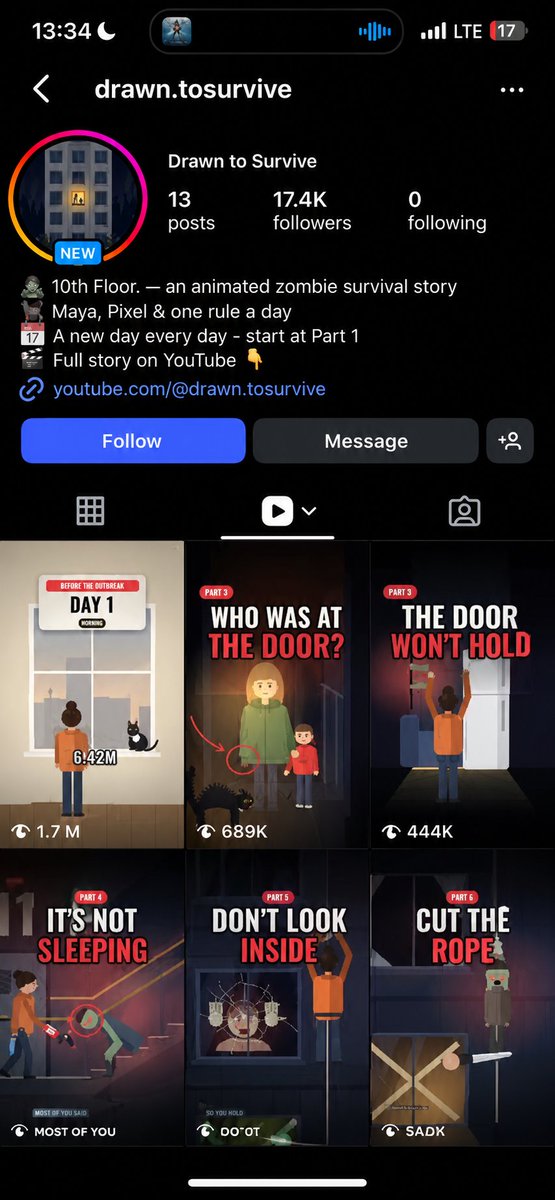
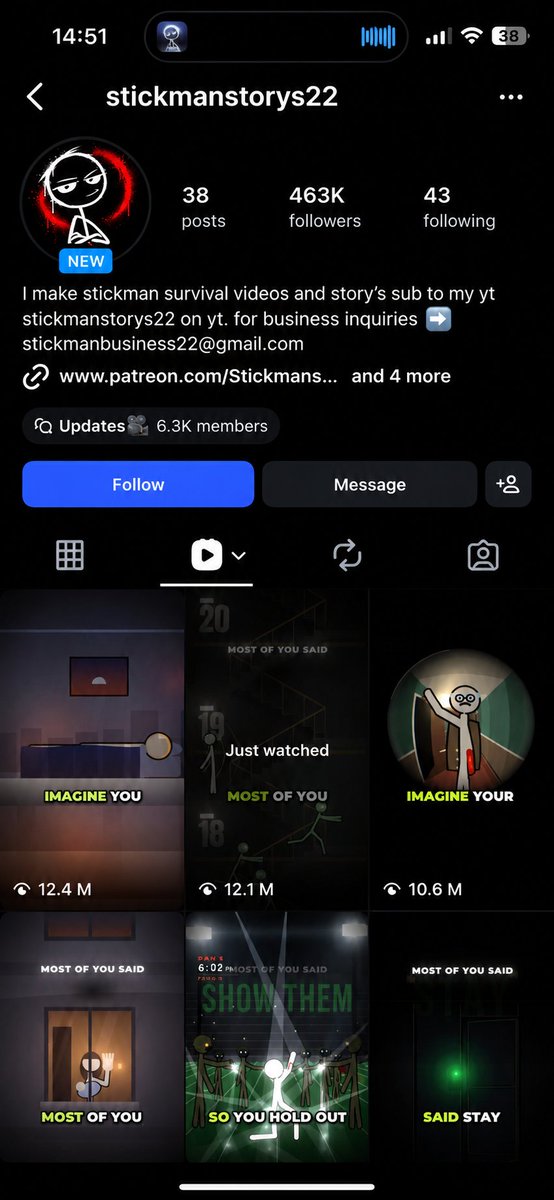
Histórias de sobrevivência em segunda pessoa, em partes, cada uma terminando numa votação nos comentários. O primeiro reel do itsquarkboi, GRIDLOCK Day 1, tem 1,7 milhão de views, e 12 dos 13 reels passaram de 100 mil:
Vídeo do artigo · 1 min 29 s
Como é feito, na bio: “animated stickman survival stories, in parts”. Na tela: bonequinhos planos, legendas curtas e um HUD com o dia, a hora e a bateria do celular.
O 10th Floor Part 1 do drawn.tosurvive também tem 1,7 milhão no Instagram:
Vídeo do artigo · 1 min 8 s
A legenda chama isso de “animated apocalypse stories based on real survival facts”. Cada parte mostra um card de regra e um card de fato.
Eu perguntei, em 28 de outubro, se vocês queriam um guia para esses:
somehow most people still don’t know that the whole theme was entirely made using opus 5.5
(with $0 spent on videos and images)
would u guys be interested if I make a full guide on how to create such videos
lemme know ur thoughts
Abrir no X · 294 curtidas · 21 reposts · 311 itens salvos
Vocês pediram, aqui está. Eu reconstruí o formato em 3D, em que stickmen 2D planos agem dentro de cômodos low-poly, com luz e sombra de verdade, sob um HUD com o dia e um relógio.
Cada frame é código. Não há imagens de IA nem vídeo de IA nisso.
UNDER THE RIVER, feito com o prompt:
Vídeo do artigo · 1 min 10 s · UNDER THE RIVER
Um avaliador do Claude deu 104/120. A série 10th Floor do drawn.tosurvive, uma das páginas por trás desse formato, tirou de 96 a 99 no mesmo avaliador.
Saiu de uma sessão nova, numa pasta vazia, com a instrução de apenas “you pick” em cada etapa.
Para começar:
cole o story_video_prompt.md no Claude Code, numa pasta vazia
responda “you pick” em cada etapa, ou dê as suas próprias notas
O Claude trabalha sozinho por cerca de 1 a 2 horas. Ouça uma vez antes de postar (o Claude não consegue ouvir a mixagem).
explainer videos are one of the highest converting formats
i automated this video in 10 minutes and turned it into a prompt you guys can use (all for free btw)
even though hes not making millions of views per video
100k attentive viewers that are curious to learn something are way more valuable than millions looking for entertainment
and might buy anything you slipped inside the video that does not feel like an ad
send this to your claude ↓…
Ver o texto completo do post (original em inglês)
explainer videos are one of the highest converting formats
i automated this video in 10 minutes and turned it into a prompt you guys can use (all for free btw)
even though hes not making millions of views per video
100k attentive viewers that are curious to learn something are way more valuable than millions looking for entertainment
and might buy anything you slipped inside the video that does not feel like an ad
send this to your claude ↓
<inputs>
Ask me for the topic and anything it must mention. Then write a 30-60 s script yourself (a 2-line hook, 3-7 points, 1 closing line) and show it to me before you record anything.
</inputs>
<direction>
A 1080x1920 explainer reel on warm cream paper (#EBE7E1 with fine noise grain). Colours: ink #1E1C1A, red #D7372C, grey #8A857E. Cards are #FBFAF8 with a 3px ink border, 20px corners and a halftone shadow (1.7px ink dots on an 8px grid, offset 13px left and 12px down).
Captions sit top left (x 120, y 196, 850px wide) in Instrument Sans 500 at 62px. Each word appears on the frame it's spoken, in light grey #B5AFA7, and turns ink in 0.2 s. One key word per line is Instrument Serif italic at 1.16x size, in red.
Titles are Anton up to 176px: the first word ink, the second red, with a hand-drawn red swash underline.
Small JetBrains Mono labels (25px, grey) sit at y 132: "// 01 · name" on the left, a stat on the right with its number in red bold.
Stamps are Anton 52px red text in a 5px red box, tilted -6°.
An original cartoon presenter (glasses, hoodie, flat colours, 6px dark brown outlines) stands bottom right, cropped at the chest, about 650x770px from x 430, y 1170. He talks the whole time.
Banned: gradients, glow, soft drop shadows, stock photos, emoji, full stops in on-screen text, and any moment where nothing moves for over 1 s.
</direction>
<structure>
Length: the voice decides, 30-60 s.
0 s line 1 states the problem in under 6 words, a UI card shows it and a red strike-through draws across it → line 2 promises the payoff, small cards pop in 0.16 s apart, a red ring draws around the payoff → halftone dot wipe 0.3 s before point 1 → each point: the header label updates, the title slams in on the spoken word, the underline draws 0.12 s later, the main card rises 0.18 s later with a number counting up over 1.15 s, a red #N badge spins in at 0.6 s, a terminal or search bar types one line in under 0.9 s → 0.3 s before the explanation everything exits upward and a demo animation acts out exactly what the voice says, with one stamp landing on the key word → halftone wipe before the last point → the closing line pays off the hook, and the last frame matches the first so it loops.
</structure>
<build>
1. Tools (all free): Node, FFmpeg, HyperFrames (npx hyperframes init), Kokoro for the voice (pip install kokoro) and faster-whisper for word timings. Install what's missing and tell me what you installed.
2. Voice: read line 1 in 3 Kokoro voices and let me pick one. Then record the whole script at speed 1.1. Cut every pause longer than 0.24 s down to 0.24 s, but only where it's truly silent (check loudness in 0.03 s windows).
3. Timing: run faster-whisper with word timestamps on the final voice file and match it to the script. Every caption word, title, stamp and gesture starts on a real word's start time, never on a guess.
4. Presenter: an SVG rig with separate head, brows, eyelids, glasses, 10 mouth shapes and 2 hands.
- Pick the mouth shape every frame from the voice loudness at 30 fps: -42 dB closed, -16 dB wide open, instant attack, 0.55 release per frame.
- Blink for 0.14 s every 2.4-4.2 s on a fixed seed.
- Sway the head slightly all the time and nod for 0.5 s on each key word.
- Raise a pointing hand from below for 1.7 s at every new point, and an open palm on every other explanation.
5. Motion:
- pop: scale 0.55 to 1 in 0.34 s, back.out(2.2)
- rise: 70px up in 0.4 s, power3.out
- exit: 50px up and fade out in 0.22 s
- slam: scale 1.22 to 1 in 0.24 s, power4.out
- stamp: scale 1.75 to 1 and -18° to -6° in 0.2 s
- wipe: 13x23 ink dots grow up to 62px from the centre out, then shrink away, 0.9 s in all
6. Layout: one HyperFrames sub-composition per point, each with its own GSAP timeline. Tracks from bottom to top: paper, scenes, presenter, captions, wipes. Run npx hyperframes check until it shows 0 errors, then look at a snapshot of the first frame of every point before you render.
7. Sound:
- one downloaded free SFX per event: pop on cards, whoosh on scene changes, a tick roll under counters, typing under the terminal, a thud on stamps
- put the loudest point of each sound on its frame
- music at 0.16 volume with a 0.8 s fade out, voice at 1.0, final mix around -15 LUFS
</build>
<gotchas>
Only one .html file can sit in the project root, so keep source files in src/. Every SFX needs its own track and a data-duration. Hide elements with CSS from the start, not with a timeline set at 0, or they flash on frame 1. Inline-block words inside a flex box lose their spaces, so put captions in a normal block.
</gotchas>
<start>
Ask me for the topic first, then show me the script.
</start>
Vídeo do post · 52 s
Imagem anexada ao post original.
Abrir no X · 1.030 curtidas · 90 reposts · 1.917 itens salvos
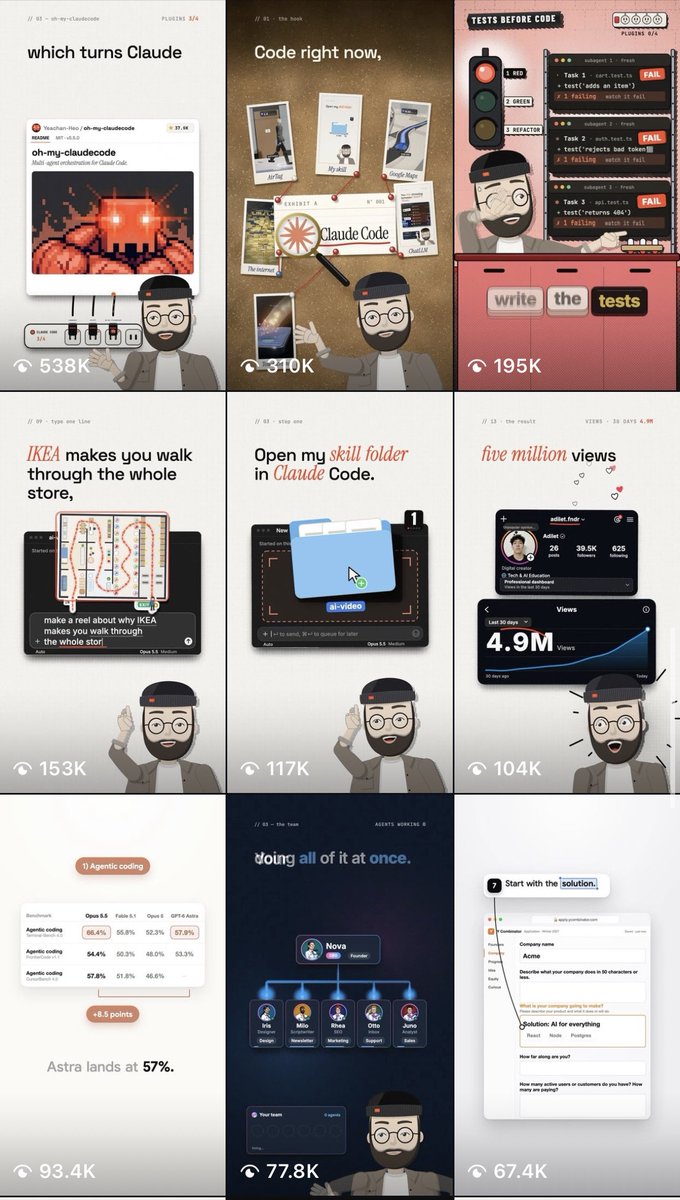
Um reel de 45 a 60 segundos que roda como uma aula curta. Um professor em cartoon fala no canto inferior direito, enquanto títulos e cards caem exatamente na palavra que está sendo dita.
Eu mantive o clima de aula dele, com o nosso próprio professor, cores e fontes. Este explica skills do Claude:
Vídeo do artigo · 55 s
Um segundo ensina as 70 páginas extras da App Store que a Apple dá para cada app:
Vídeo do artigo · 53 s
Um avaliador cego deu 65/80 e 71/80, com toda linha em 7 ou mais. A voz roda no seu computador, então precisa só do Claude.
O reel do professor falando também funciona para canais grandes. O “How Big Tech Ships Code to Production”, do ByteByteGo, tem 1.990.658 views no YouTube:
Vídeo do artigo · 55 s
Como é feito: o apresentador fala para a câmera durante os 58 segundos, enquanto um diagrama se monta acima dele, um passo por frase. O nosso guia faz isso com um professor em cartoon desenhado em código.
O “AI Agents explained in 3 steps”, do Jeff Su, tem 877.283 views, cerca de 36 vezes a mediana de Shorts do canal dele:
Vídeo do artigo · 52 s
Ele aparece na câmera por 2 segundos, depois cards escuros montam o Nível 1 a 3, com um visto ou um X em cada um (os nossos carimbos fazem o mesmo trabalho).
Para começar:
salve o explainer_prompt.md como CLAUDE.md numa pasta vazia
abra o Claude Code ali e diga “make a reel” mais o seu tema
im open sourcing the prompt template for these motion designs
steal it to recreate these ↓…
Ver o texto completo do post (original em inglês)
opus 5.5 is f*cking cracked at motion design
this entire video is code, 0 after effects
im open sourcing the prompt template for these motion designs
steal it to recreate these ↓
<inputs>
Ask me for: 8 to 12 UI states I want the shape to become (e.g. button, loader, player, slider, toggle, tabs, chart, command palette, toast), pure black and white or one accent color, and a royalty-free song around 120 BPM (e.g. Mixkit, free for commercial use).
</inputs>
<direction>
Dribbble-level UI motion. One shape, never cut: every state is the same element morphing its size, radius and color while its content swaps with a short blur. A cursor drives every change with real clicks and drags. Light warm-gray canvas, black and white components, one clean UI font (Geist). Springs everywhere, a tiny overshoot at most. The camera zooms so each state fills the frame. The last frame is the first frame, so it loops.
Banned: bouncy easing, particle bursts, glows, gradients on UI chrome, mismatched icon strokes, dead time, anything that looks like a template.
</direction>
<structure>
120 BPM, 7 bars, something happens on every beat.
Button → loader → check → dynamic island → music player with a play/pause morph → scrub the progress bar → it becomes a volume slider that stretches when dragged past max → a toggle flips on the beat → the knob becomes a liquid tab indicator → the tabs open into a chart that draws itself, with a tooltip on hover → it collapses into ⌘K → type to filter → enter → toast → back to the button.
</structure>
<build>
1. One HTML file, square 1440x1440. Every style is computed from time inside seek(t): no CSS transitions, no timers, no state carried between frames.
2. Springs are closed-form step responses. A value that changes target many times is the sum of one spring per change, so it stays a pure function of time.
3. The tab indicator's two edges ride different springs, so the leading edge stretches ahead of the trailing one. Same trick for the toggle knob.
4. Drags are direct manipulation: while the cursor is held, the value is computed from its position. On release it springs back from wherever it was.
5. Analyze the song with numpy for the beat grid and start on a downbeat. Place every UI sound by its measured peak.
6. Render with Playwright: 4 subframes per frame, blended with ffmpeg tmix for motion blur at 60fps.
7. Render one frame per beat before the full render. Fix anything off the grid, cramped or hard to read.
</build>
<gotchas>
Never put will-change on anything the camera scales or the text renders blurry. Text that swaps inside a morphing container needs its own enter and exit timing or it overlaps. Make the last frame identical to the first, cursor position and speed included, or the loop stutters.
</gotchas>
<start>
Ask me for the inputs, then show me the state list on the beat grid before you write any code.
</start>
Vídeo do post · 14 s
Abrir no X · 12.836 curtidas · 780 reposts · 21.263 itens salvos
O template completo está no post (não há nada para desbloquear). Precisa só do Claude e de uma música gratuita do Mixkit.
Para começar, copie o template, preencha os inputs e cole no Claude Code.
5. O explainer espacial do @finnardley
Um explainer de 30 segundos no estilo Kurzgesagt, “e se o Sol desaparecesse?”, desenhado em código, com uma Terra em WebGL, um mascote astronauta e narração sincronizada com a palavra.
249.422 views e 5.219 itens salvos desde 25 de outubro:
i just re created kurzgesagt's entire channel in 10 minutes with claude opus
they have 0 competition because every video takes a full team of animators and 1200+ hours to make
i turned it into a claude prompt that im giving out for free
open claude code, paste the prompt, pick an idea, and your video is fully automated
thank me later ↓…
Ver o texto completo do post (original em inglês)
i just re created kurzgesagt's entire channel in 10 minutes with claude opus
they have 0 competition because every video takes a full team of animators and 1200+ hours to make
i turned it into a claude prompt that im giving out for free
open claude code, paste the prompt, pick an idea, and your video is fully automated
thank me later ↓
<inputs>
Ask me for: one topic as a "what if" question (default: "What if the Sun vanished?"), the length (default 30 seconds), and whether I have an ElevenLabs key (if not, use a free local voice).
</inputs>
<direction>
A Kurzgesagt-style animated explainer at 1920x1080, 30fps, drawn entirely in code: one 2D canvas plus one WebGL canvas for planets.
Space: a vertical gradient #081d2c to #102348, five huge parallax nebula blobs (teal rgb 24,150,160 at 20%, blue 40,95,195 at 16%, coral 220,95,110 at 10%, indigo 60,70,175 at 15%), three star layers at parallax depths .12/.35/.6 that twinkle, 40% of the near stars drawn as 4-point sparkles.
The Sun: radius 300px, half off the left edge. A radial gradient #fff7dc to #ffc857 to #ff8f4a with an offset highlight, additive halo rings at 1.23/1.48/1.76/2.1x the radius, 18 faint rotating ray wedges, 28 drifting glowing granules on its surface.
Earth: an orthographic sphere in a fragment shader, 4x supersampled, from a 2048x1024 map painted from longitude/latitude polygons: land #5fc47a, forest #48ad6b, desert #f5c75f, rainforest #3a9d62, ice #f1f8ff, ocean gradient #4dc7eb to #1a66b8, white capsule clouds. Tilt .26 rad, spin .55 degrees per second. Day/night uses smoothstep(-.12, .24, N·L) with the light direction recomputed from Sun to Earth every frame. Navy night side with ~380 warm city lights, a coral band on the terminator, a cyan rim, ocean specular, an atmosphere halo that is stronger on the lit side.
A small astronaut mascot (~180px) built from rounded rectangles: suit #f3f7fb, orange #ff8f4a boots, a visor gradient #1f5a73 to #0a1c2c with glowing cyan eyes that look at whatever matters, a blinking antenna light, an idle bob, squash and stretch on every pose.
Type: Fredoka 600/700 only. Captions in caps with 3-6px letter spacing in teal #8fd8e6, gold #ffd98a or white, sitting in rounded pills of rgb(6,20,40) at 62%. Every line of text rises 1.3x its own height through a clip on an ease-out-quint.
Finish: a vignette to rgba(4,4,20,.45) and a 6% film grain re-randomized 24 times per second.
Banned: outlines, flares or loops on the Sun's edge, static infographic strips, full stops in on-screen text, text that fades in whole, AI images or AI video, Kurzgesagt's own characters, bird or music.
</direction>
<structure>
30 seconds, every line of narration gets a camera move or a transformation, nothing ever holds still.
Tight on the Sun at 2.25x (0s) → on the word "vanished" it swells 6% for 0.22s, collapses in 0.33s, then a white flash and a shockwave ring (1s) → pull back to 1x revealing Earth still lit and the astronaut staring at the empty spot (1.6-3s) → on "eight" an 8:20 countdown slams in from 1.7x to 1x and starts ticking, a "LAST LIGHT" label rides the edge of the growing dark disc (3.2s) → dive to 2.3x on Earth with light streaks flowing in (5.6s) → on "you" a YOU pin drops (7s) → on "left" a photon lands on the pin with "THIS LIGHT LEFT THE SUN / 8 MIN 20 SEC AGO" (7.5s) → on "play" the pin morphs into a play button, "YOU PRESSED PLAY / 15 SEC AGO" (8.8s) → one pull-back from 2.4x to a 0.3x orbit view, "LAST LIGHT" and "GRAVITY" riding the ring (9.6-12.5s) → on "nothing" a dotted circle at the empty centre (13.4s) → on "hits" the darkness sweeps Earth in 0.7s, city lights pop on, the countdown turns gold at 0:00 (15.8s) → on "black" the background fades almost to black (17.4s) → Jupiter appears, "STILL SHINING FOR 1 HOUR+" (17.9s) → zoom out, a dashed tangent line, "30 KM/S" as Earth flies straight off (20.8s) → a thermometer counts 15 to -70°C while frost grows from the poles (22.8s) → a 0.8s rewind on a separate story clock (24.3s) → sunglasses drop onto the astronaut (25.2s) → a photon tagged "8:20 OLD", then the title (27.7s).
For any other topic, keep the same shape: the event happens on its word, pull back to show scale, dive in to make it personal ("you"), pull back out, the consequence with a live counter, an escalation, a funny beat with the mascot, a callback and the title.
</structure>
<build>
1. One HTML file. Every frame is a pure function of time: https://t.co/lT4Z2IvSIB(t) draws frame t. No timers, no CSS animation.
2. Camera moves on easeInOutCubic, zoom is interpolated in log space, every pop is a damped spring (damping .42-.5, frequency 12-16).
3. Voice: ElevenLabs eleven_v4 with a designed voice (calm, warm, curious male, late 30s, crisp, light neutral European English), stability .5, similarity .75, generated with timestamps. Without a key, use kokoro-onnx locally and get word times with faster-whisper. Every animation event fires on its word. About 165 words per minute, 0.24s between sentences, a 0.36s beat before the big reveal.
4. The darkness front: any pixel within the front's radius from the Sun turns to night with a 30px soft edge. The front moves at ~47px/s and ramps to 700px/s near Earth.
5. Keep two clocks: ambient time for twinkle, spin and bob, and a separate story clock for events, so a rewind stays consistent.
6. Render with Playwright in headless Edge with the GPU: seek every frame at 30fps and blend 2 subframes (shutter 0.6) for motion blur, then encode with libx264 at CRF 16 for the master and CRF 20 for delivery.
7. Sound: a calm royalty-free space music bed 7dB under the voice, timed so its natural ending lands on the title, swelling 5dB under the title. One downloaded royalty-free sound effect per event kind (collapse, impact, pull-back whoosh, countdown tick, dive, pin tap, photon land, play click, light hit, reveal, frost, rewind), each peak-aligned to its frame and 4-10dB under the voice. Master with gain plus a limiter to -14 LUFS, -2.2dB true peak.
</build>
<gotchas>
Make the WebGL globe canvas at least 2 x radius x zoom x 1.18 pixels or the sphere clips flat in close-ups. Never draw prominences on the Sun's edge, they read as white hooks. Never pad the voice to fit the visuals, tighten the read instead. Speed the darkness front up near Earth or it takes 13 seconds to cross the planet. Show me a contact sheet of every beat before rendering.
</gotchas>
<start>
Ask me the inputs, write the narration with the beat each word triggers, show it to me, then build and render the video.
</start>
Vídeo do post · 30 s
Abrir no X · 3.117 curtidas · 196 reposts · 5.338 itens salvos
O prompt completo está no post. O ElevenLabs é opcional, porque, sem uma chave, ele muda para uma voz gratuita que roda no seu computador.
Para começar, cole o prompt no Claude Code com o seu próprio “e se”.
6. Os cartoons 2D “e se” do @kelanoo
Cartoons de “What If” de 15 a 25 segundos, num estilo de bonequinho à luz do entardecer. O personagem é desenhado em código, então o herói nunca muda de um plano para o outro.
O post dele sobre isso tem 1.689 itens salvos. O link gratuito está nesta resposta:
Vídeos animados curtos, desenhados num único canvas em código, em 7 estilos embutidos, de papel recortado a pixel art, ou qualquer visual a partir das suas próprias referências.
Você aprova a história, o visual e o storyboard antes de ele animar. O tutorial gratuito de 14 minutos (Chase-H-AI no YouTube) tem 202.795 views:
Imagem do artigo, seguida do tutorial no YouTube citado no texto.
Filmes curtos com narração e música, em 66 estilos prontos, cada um com um filme de demonstração, feitos por lemomo-ai no GitHub.
9.749 estrelas, o maior número de qualquer biblioteca gratuita de vídeo para Claude Code que eu encontrei. O @Voxyz_ai postou a dica de instalação (ele fala em 43 estilos; o repositório cresceu desde então):
Claude Code tip: install lemo-opuscar and Opus 5.5 can make 𝘀𝗵𝗼𝗿𝘁 𝗳𝗶𝗹𝗺𝘀 𝘄𝗶𝘁𝗵 𝗻𝗮𝗿𝗿𝗮𝘁𝗶𝗼𝗻 𝗮𝗻𝗱 𝗺𝘂𝘀𝗶𝗰 in 43 film styles, all in code.…
Ver o texto completo do post (original em inglês)
Claude Code tip: install lemo-opuscar and Opus 5.5 can make 𝘀𝗵𝗼𝗿𝘁 𝗳𝗶𝗹𝗺𝘀 𝘄𝗶𝘁𝗵 𝗻𝗮𝗿𝗿𝗮𝘁𝗶𝗼𝗻 𝗮𝗻𝗱 𝗺𝘂𝘀𝗶𝗰 in 43 film styles, all in code.
𝗡𝗼 𝘃𝗶𝗱𝗲𝗼 𝗺𝗼𝗱𝗲𝗹. It renders every frame in code, builds the score from free sample libraries and voices the narration with TTS. Each style comes with a sample film it made.
A film takes about 30 to 60 minutes and uses a lot of tokens, and the first run downloads over 1 GB of tools and voice models. You'll need Node 20+, ffmpeg and Python 3.11–3.13 (or uv).
Run these two lines in your terminal and Claude Code gets all 43 styles:
claude plugin marketplace add lemomo-ai/lemo-opuscar
claude plugin install lemo-opuscar@lemolab
Then open Claude Code and send this to get a launch film for your project 👇
"Use lemo-opuscar's Dark Tech Keynote style. Read this project's README first, then make a 45-second launch film for it with English narration."
Abrir no X · 358 curtidas · 23 reposts · 635 itens salvos
Precisa só do Claude, com modelos de voz gratuitos e bibliotecas de samples gratuitas para a trilha.
O porém é o tempo. Um filme leva de 30 a 60 minutos e uma boa quantidade de tokens, mais um primeiro download de mais de 1 GB.
Para começar, instale como um plugin do Claude Code com os dois comandos do README.
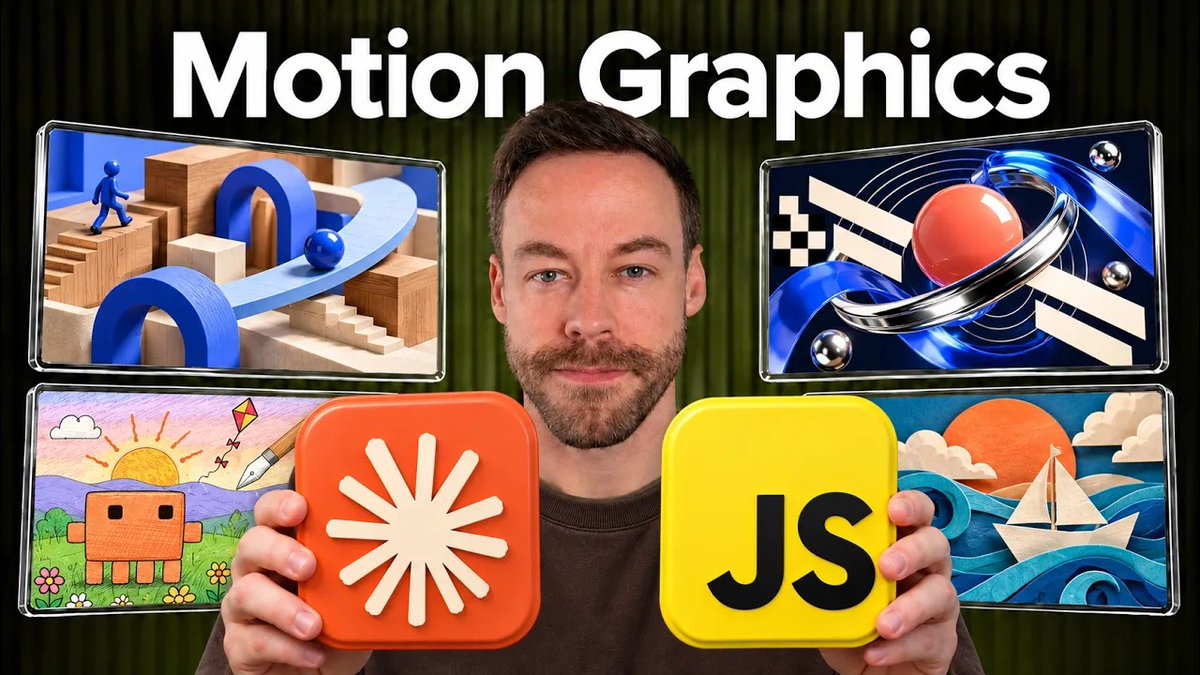
Uma biblioteca clicável de 120 samples em movimento, de showheyohtaki, de movimentos de câmera a peças de UI e efeitos para web. Marque os que você gostar e o Claude Code coloca isso no seu vídeo.
63.063 views e 1.636 itens salvos no post do @Voxyz_ai:
Give Opus 5.5 𝗮 𝗰𝗹𝗶𝗰𝗸𝗮𝗯𝗹𝗲 𝗺𝗼𝘁𝗶𝗼𝗻 𝗱𝗶𝗰𝘁𝗶𝗼𝗻𝗮𝗿𝘆: 𝟭𝟮𝟬 𝗺𝗼𝘃𝗶𝗻𝗴 𝘀𝗮𝗺𝗽𝗹𝗲𝘀, each labelled with its name and a ready-made prompt. Click the ones you like, and Claude Code builds them into your video or site.…
Ver o texto completo do post (original em inglês)
Give Opus 5.5 𝗮 𝗰𝗹𝗶𝗰𝗸𝗮𝗯𝗹𝗲 𝗺𝗼𝘁𝗶𝗼𝗻 𝗱𝗶𝗰𝘁𝗶𝗼𝗻𝗮𝗿𝘆: 𝟭𝟮𝟬 𝗺𝗼𝘃𝗶𝗻𝗴 𝘀𝗮𝗺𝗽𝗹𝗲𝘀, each labelled with its name and a ready-made prompt. Click the ones you like, and Claude Code builds them into your video or site.
Five packs: motion graphics, camera moves and transitions, UI components, landing page and web effects, and photo looks and lighting.
Four steps:
1. Paste the line at the end into Claude Code to install the skill
2. Tell it "Open the motion-prompt library"
3. Tick the samples you like in the gallery and press "Send to AI"
4. Back in Claude Code, say "Edit the opening of this video like this"
It gets each sample's motion spec and reference code, and it works with Remotion, CSS or Canvas. Without the skill, press "Copy picks" and paste them in.
Paste this into Claude Code and it installs itself 👇
"Read https://github.com/showheyohtaki/motion-prompt and install the motion-prompt skill in this environment. When it is installed, tell me how to use it in three lines."
Vídeo do post · 20 s
Abrir no X · 945 curtidas · 70 reposts · 1.668 itens salvos
Isso melhora qualquer formato acima (os meus inclusive), porque só muda a forma como as coisas se movem. O uso comercial vale se você mantiver a linha de crédito.
Para começar, cole no Claude Code o prompt de instalação de uma linha que está no repositório.
Uma instrução que aponta o Claude para a API gratuita do archive.org, para puxar filmes em domínio público, discos de 78 rpm e gravações de shows para a sua edição. Não precisa de chave.
240.722 views e 8.285 itens salvos, cerca de 2,3 para cada curtida:
“whenever you need archival b-roll or period music, search the prelinger and 78rpm collections on https://archive.org/ and use them in the edit”
some great clips that are amazing for slightly more artsy ads for tech
Vídeo do post · 15 s
Abrir no X · 3.592 curtidas · 206 reposts · 8.289 itens salvos
Entregue a linha dele ao Claude antes da etapa de edição (é UMA linha). Ela cobre os clipes e a música de todos os formatos acima.
O que eu não testei
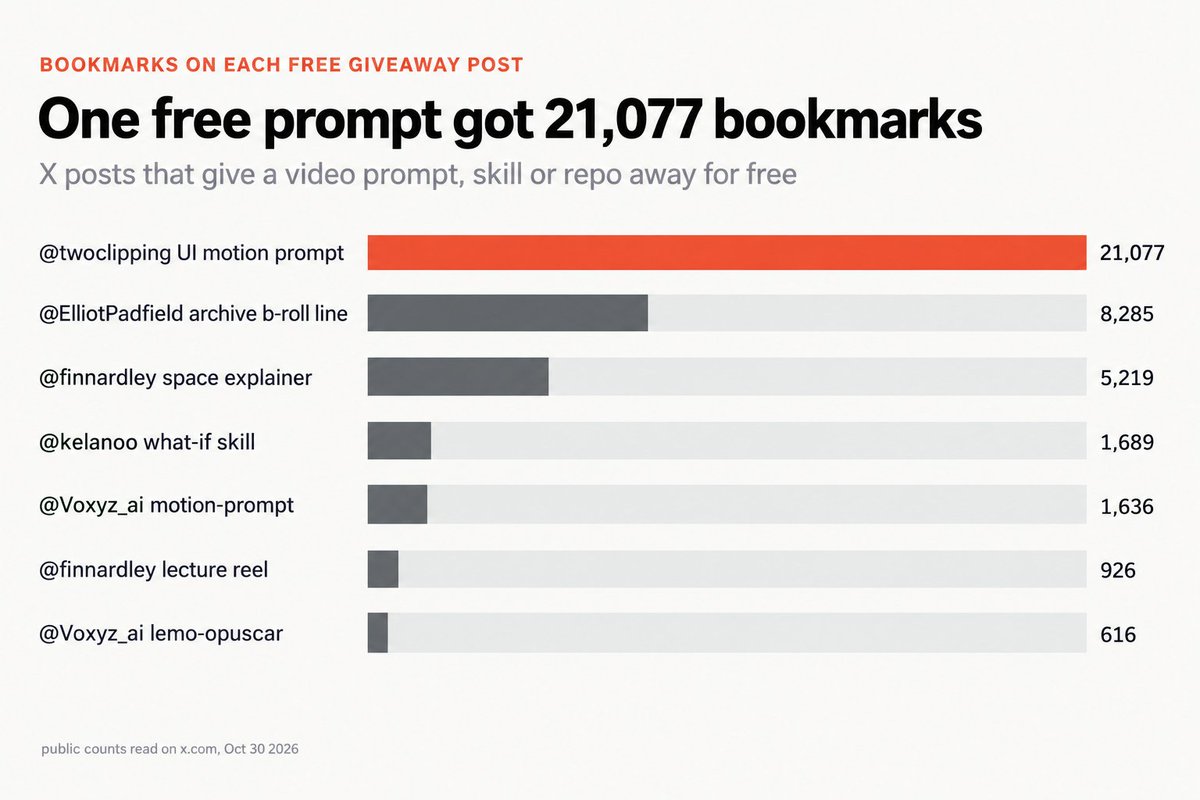
Eu rodei os meus 3 do começo ao fim, com notas cegas do Claude. Os outros 7 eu li, conferi se havia alguma trava e contei, mas não rodei. É isso que a contagem diz:
Gráfico do artigo, com contagens públicas lidas no X em 30 de outubro de 2026.
Itens salvos dizem que as pessoas quiseram aquilo. Não dizem que o resultado é bom. Cada número foi lido em 30 de outubro.
Por qual começar
uma página à qual as pessoas voltam: a história de sobrevivência em stickman
o maior formato já comprovado: o quintal 3D (58,6 milhões no TikTok desde 11 de outubro)
uma lição em menos de um minuto: o reel de aula ou o explainer espacial do Finn
uma primeira vitória rápida: o prompt de UI do @twoclipping
melhor motion ou clipes gratuitos para qualquer um deles: motion-prompt e a linha do Elliot
Salve isto antes do seu próximo vídeo; cada link está aqui.

Theo @theoardley 28 de outubro de 2026, 10:19 (America/Sao_Paulo)
These ai pages are going insanely viral on ig rn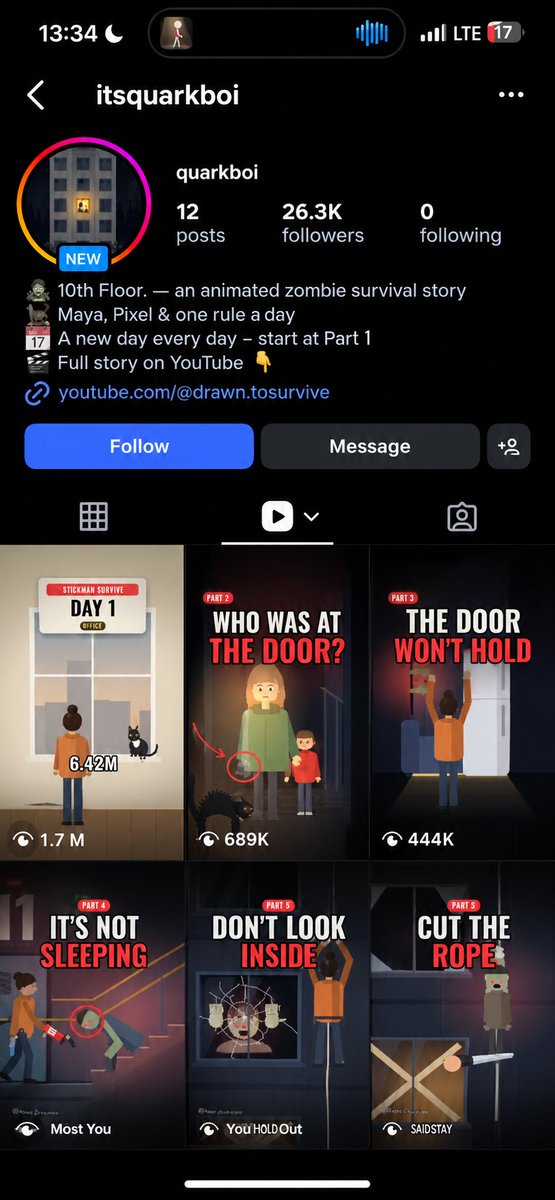
 Abrir no X · 294 curtidas · 21 reposts · 311 itens salvos
Finn @finnardley 30 de outubro de 2026, 00:32 (America/Sao_Paulo)
zero @twoclipping 24 de setembro de 2026, 20:58 (America/Sao_Paulo)
Baptiste (Kelano) @kelanoo 24 de outubro de 2026, 11:25 (America/Sao_Paulo)
Everything you need is here, free accessRoidz 〽️ @Deroidz 25 de outubro de 2026, 09:51 (America/Sao_Paulo)
@kelanoo made this in 10 minutes, crazy.Vídeo do post · 19 sAbrir no X · 9 curtidas · 1 reposts · 13 itens salvos
Vox @Voxyz_ai 15 de outubro de 2026, 18:00 (America/Sao_Paulo)
Elliot Padfield @ElliotPadfield 22 de outubro de 2026, 19:15 (America/Sao_Paulo)
if you're using claude to edit videos, give it 17M+ films and 14M audio recordings for $0